
Are you struggling to convert website visitors into customers? Are you Googling “My website is not converting?”. You’re not alone. Many businesses invest time and money into creating a beautiful website but fail to see the desired results when it comes to conversions. The good news is that there are common reasons why a website may not be converting, and the even better news is that there are solutions to fix them.
In this article, we’ll explore the top five reasons why your website isn’t converting, and provide practical tips and strategies to help you turn things around. Whether you’re a small business owner, a marketer, or a website designer, this article will give you the insights you need to optimise your website and drive more conversions. So, let’s dive in and get your website working harder for you!
Why isn’t my site converting?
It’s frustrating to see traffic to your website but no conversions. However, before you start making changes to your website, it’s essential to identify the root cause of the problem. Here are a few reasons why your website may not be converting:
Reason 1: Slow Loading Speed
 A slow-loading website can be frustrating for users and can lead to high bounce rates. According to a study, 47% of users expect a website to load in two seconds or less. If your website takes longer than that, it’s time to optimise it for speed.
Use our fast managed VPS hosting solution today
Reason 2: Poor User Experience
Users want to navigate through a website with ease. If your website has a complicated navigation structure or is difficult to use, it’s a huge turn-off to potential customers. A poor user experience can also lead to high bounce rates.
Reason 3: Lack of Trust
Trust is critical when it comes to converting website visitors into customers. If your website doesn’t look trustworthy, users are less likely to make a purchase or submit their contact information. A lack of trust can be caused by poor website design, a lack of social proof, or a lack of security measures.
Reason 4: Unclear Call-to-Actions
 Your website’s call-to-actions (CTAs) need to be clear and compelling. If your website’s CTAs are unclear, users may not know what action to take, and therefore, won’t convert. Your CTAs should be visible and easy to find on your website.
Reason 5: You’re not testing
Every online business is a little different, and so are their clients. Best practises are a good place to start, but they are not enough.
A solid website testing method is crucial for transforming your website from merely average to a highly converting system. There are numerous tools available now to assist you in testing the various aspects of your website. Google Analytics, and HotJar are among our favourite tools at softdata.
Why you ask?
Your website’s content needs to be informative and engaging. If your website’s content is boring, users won’t stick around long enough to convert. Poor content can also lead to high bounce rates.
Slow Loading Speed: How to optimise your website loading speed
A slow-loading website can be frustrating for users and can lead to high bounce rates. Here are a few ways to optimise your website loading speed:
1. Compress Images
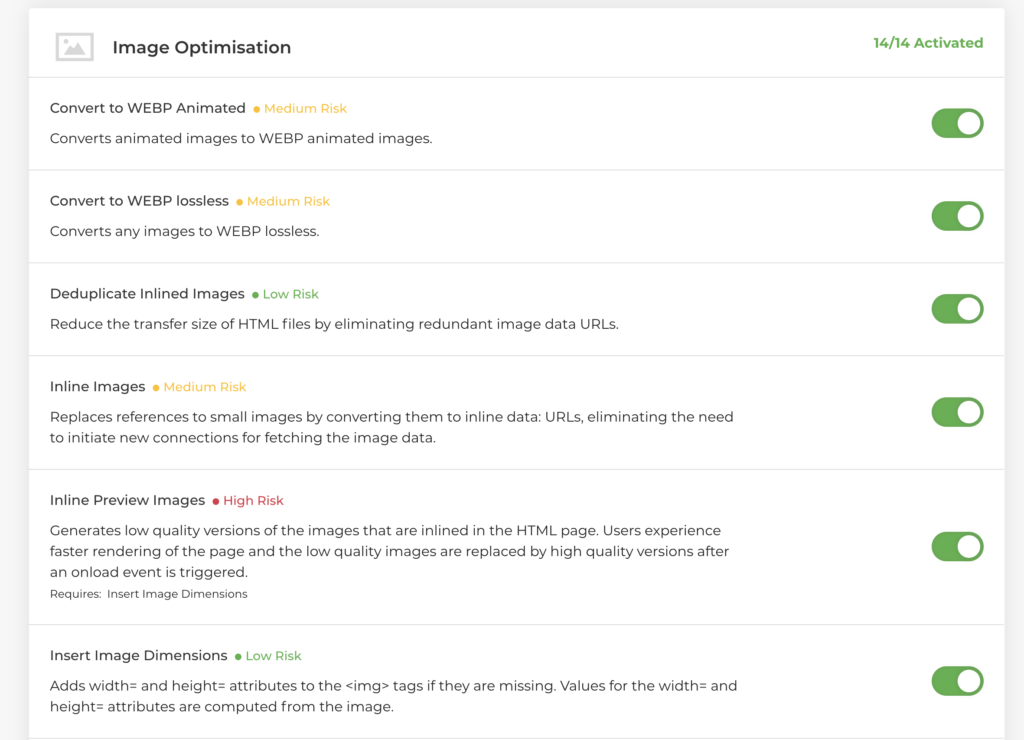
Images can slow down your website. To speed up your website, compress your images without losing the quality. There are many tools and free plugins available to compress images in the latest formats such as SVG and WEBP.
At softdata, we use all of the above and many other methods to reduce the size of a web page with our comprehensive image optimisation caching services 😉
2. Minimise HTTP Requests
An HTTP request is made for every file on your website, including images, scripts, and stylesheets. The more HTTP requests your website has, the slower it will load. To minimise HTTP requests, combine multiple files into one.
Tip: Only load scripts and files you use on any web page. It can be time consuming to setup but you can usually reduce the total requests by 60-70%
3. Use Browser Caching
Browser caching is a way to store website data on a user’s computer. When a user visits your website again, the data is already stored on their computer, making your website load faster. To use browser caching, add caching headers to your website’s response headers.
4. Use a Content Delivery Network (CDN)
A CDN ensures that your website’s content is delivered from the server closest to the user, reducing the time it takes for your website to load. There are many CDN providers available – including softdata’s CDN which is free on all hosting services!
5. Use a Faster Web Host
The speed of your website is also affected by your web host. If your website is hosted on a slow server, it will take longer to load. Consider upgrading to a faster web host to improve your website’s loading speed.
Poor User Experience: How to improve user experience on your website
Users want to navigate through a website with ease. Here are a few ways to improve user experience on your website:
1. Simplify Navigation
Your website’s navigation should be simple and easy to use. Avoid complicated navigation structures and use clear labels for your menus. Users should be able to find what they’re looking for quickly.
2. Use Clear Headings and Titles
Your website’s headings and titles should be clear and descriptive. Users should be able to understand what your website is about from the headings alone.
3. Use High-Quality Images and Videos
High-quality images and videos can make your website more engaging. Use images that are relevant to your content and of high quality.
4. Use White Space
White space is the space between design elements. Using white space can make your website look cleaner and less cluttered, improving user experience.
5. Optimise for Mobile
More than half of website traffic comes from mobile devices and it’s the leading reason why users leave a website! Ensure that your website is optimised for mobile devices, including smartphones and tablets. Use responsive design to ensure that your website looks good on all devices.
Lack of Trust: Strategies to build trust with your website visitors
Trust is critical when it comes to converting website visitors into customers. Here are a few strategies to build trust with your website visitors:
1. Use Social Proof
Social proof is a great way to build trust with your website visitors. Include customer reviews, testimonials, and case studies on your website.
2. Use Security Measures
If your website requires users to submit personal information, such as their email address or credit card information, ensure that your website is secure. Use an SSL certificate to encrypt user data and make sure that your website’s security is up to date.
3. Use Trust Badges
Trust badges, such as security badges or payment badges, can help build trust with your website visitors.
4. Be Transparent
Be transparent about your business and your products or services. Include an “About Us” page on your website and be clear about what you offer.
5. Use Professional Design
A professional website design can also help build trust with your website visitors. Invest in a high-quality website design to make your website look professional and trustworthy.
Unclear Call-to-Actions: How to create effective CTAs to increase conversions
Your website’s call-to-actions (CTAs) need to be clear and compelling. Here are a few ways to create effective CTAs:
1. Use Action-Oriented Language
Your CTAs should use action-oriented language. Use verbs such as “sign up,” “Subscribe,” or “buy now” to encourage users to take action.
2. Use Urgency
Creating a sense of urgency can also increase conversions. Use words such as “limited time offer” or “only a few left” to create urgency.
3. Use Colour
The colour of your CTAs can also affect conversions. Use a colour that stands out from the rest of your website’s design, such as red or orange.
4. Use Placement
The placement of your CTAs can also affect conversions. Place your CTAs in prominent locations, such as at the top of your website or in the middle of your content.
5. Use Testing
Test different CTAs to see which ones work best. Use A/B testing to compare different CTAs and see which ones lead to more conversions.
Conclusion: My website is not converting
In conclusion, there are common reasons why your website is not converting, but there are also solutions to fix them. By optimising your website for speed, improving user experience, building trust, and creating effective CTAs, you can increase conversions on your website. Remember that website optimisation is an ongoing process. Continuously test and optimise your website to ensure that it’s working as hard as possible to drive conversions.
We don’t just provide web design services; with our Local SEO services, content marketing campaigns, and so much more, we can also help your current website take off and increase conversions.
For more than 20 years, we have been giving our clients outstanding, successful services that actually benefit their businesses.
Do you want softdata to review your website for free? Set up a free consultation today!
Digital Marketing Agency in Gloucester and Cheltenham
Softdata is a leading digital agency and AI Services provider based in Gloucester and Cheltenham.About us: Softdata is a premier digital software agency and digital marketing provider, based in Gloucester and Cheltenham. We offer a range of digital services including web design, bespoke software development, SEO, Paid advertising, conversion rate optimisation, web hosting, and AI consultancy services. Our team is dedicated to providing the best solutions tailored to the unique needs of our clients.
If you would like to discuss your needs with a Digital Specialist, we offer a Free Initial Consultation without cost or commitment. Meetings can be held at our offices, via video conference, or by telephone. Our telephone number is 01452 502 508.
Softdata is located at: Softdata Internet Limited, 80 Westgate Street, Gloucester, GL1 2NZ.