
The realm of e-commerce is teeming with opportunities for businesses to reach new heights. One such opportunity lies in Google Shopping, a platform that connects buyers and sellers across the globe. A crucial aspect that influences buyers’ choices on Google Shopping is the availability of free and fast shipping. This guide will delve into the nitty-gritty of how to add free shipping to Google Shopping, a feature that can significantly enhance your business’s visibility and allure.
 Understanding Google Shopping and Its Importance
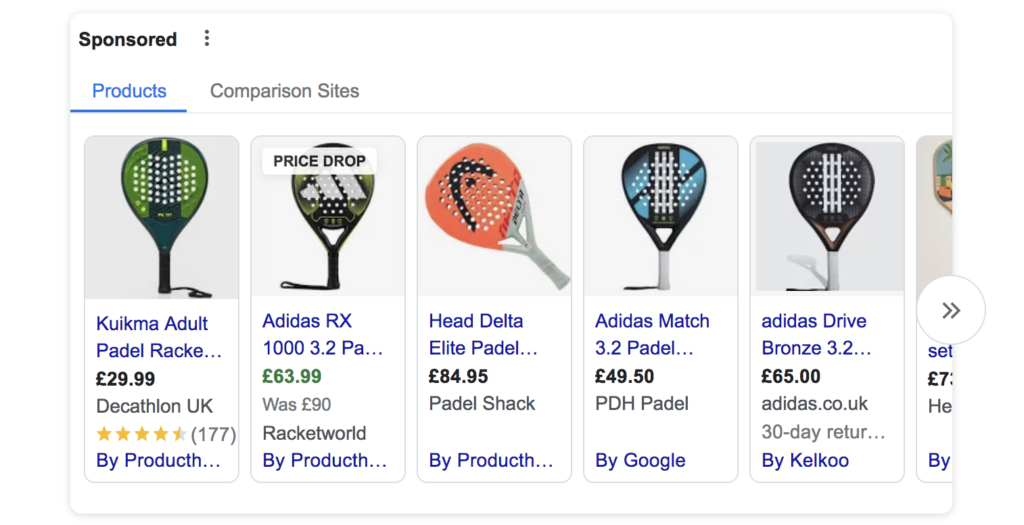
Google Shopping is a service provided by Google’s Pay Per Click model that allows customers to search, compare, and shop for products directly through Google search. It is an invaluable tool for online retailers aiming to boost their product visibility.
Why is Google Shopping Important?
-
- 66% of consumers anticipate that retailers will provide free shipping.
- 73% of buyers are inclined to purchase a product when free shipping is offered.
- Retail outlets offering free shipping experience a 20% increase in conversion rates.
- 62% of consumers anticipate receiving their free shipping orders within 3 business days.
- 53% of buyers are hesitant to finalise a purchase without a clear delivery date.
- Free shipping entices 79% of consumers to shop online.
Google Shopping offers several benefits that make it an indispensable tool for online retailers:
- Enhanced Product Visibility: Google Shopping ads appear at the top of search results, giving products a high visibility that regular search results cannot provide.
- Detailed Product Information: Google Shopping ads provide detailed product information, including the image, price, brand, and reviews, which help customers make informed decisions.
- Performance Tracking: Google Shopping allows you to track the performance of your ads and understand what works best for your products and what doesn’t.
88% of online shoppers consider free shipping important
The Power of Free Shipping in E-commerce
The allure of free shipping in e-commerce cannot be overstated. A study by Ipsos found that 88% of online shoppers consider free shipping important when choosing where to shop. This is not surprising as shipping costs are often a significant factor in cart abandonment. Hence, offering free shipping can substantially increase conversion rates and customer satisfaction.
Adding Free Shipping to Google Shopping
Step 1: Assessing Your Business Model
The first step is to evaluate whether offering free shipping aligns with your business model. Consider your profit margins, product weight and size, and average order value. If your margins are slim, offering free shipping on all products may not be feasible. However, you could consider offering free shipping on orders above a certain value or on specific items.
Step 2: Setting Up Free Shipping in Your E-commerce Platform
Before you can add free shipping to Google Shopping, you need to set it up on your e-commerce platform. The process varies depending on the platform you use (Shopify, WooCommerce, Magento, etc.). Generally, you’ll need to navigate to your shipping settings and create a new shipping zone and rate for free shipping.
Step 3: Configuring Free Shipping in Google Merchant Center
Once free shipping is set up on your e-commerce platform, you need to configure it in the Google Merchant Center:
- Go to the Google Merchant Center and sign in to your account.
- Navigate to the “Shipping and returns” section.
- Click on “+ Create services” and define the parameters for free shipping (country, transit time, etc.).
- Set the price to zero to indicate free shipping.
Step 4: Adding Shipping Information to Your Product Data
Google Merchant Center uses the shipping data from your product feed to determine which items qualify for the free shipping label. You need to add a ‘shipping’ attribute to your product data and set the value to ‘US:::0.00’ for items that qualify for free shipping.
Step 5: Updating Your Google Shopping Ads
After configuring free shipping in Google Merchant Center and updating your product data, you need to refresh your Google Shopping feed. This will update your Google Shopping ads to display the free shipping label.
Ensuring Fast Delivery with Efficient Fulfilment
Offering free shipping alone may not be enough. Today’s online shoppers also expect fast delivery. By partnering with efficient fulfilment services like ShipBob, GoDataFeed, and Aten Software, you can ensure fast delivery and enhance customer satisfaction.
Final Thoughts
Implementing free shipping in Google Shopping requires careful planning and consideration. However, the benefits it can bring to your business in terms of increased conversions and customer satisfaction make it a worthwhile investment. Remember, the ultimate goal is to provide value to your customers, and free and fast shipping does just that.
Start optimising your Google Shopping experience today, and witness the transformation in your e-commerce journey!
Need help with your Google Shopping feed?
The journey of how to add free shipping to Google Shopping may appear daunting initially, but with the right guidance and tools, it becomes a walk in the park. The process requires a careful understanding of your business model, setting up free shipping in your e-commerce platform, configuring it in Google Merchant Center, and updating your product data and Google Shopping Ads.
In an era where online shoppers are continually seeking the best deals, offering free and fast shipping becomes a significant advantage. So, adopt this strategy today and observe a remarkable increase in your conversion rates and overall business growth. Happy selling!
Digital Marketing Agency in Gloucester and Cheltenham
Softdata is a leading digital agency and AI Services provider based in Gloucester and Cheltenham.About us: Softdata is a premier digital software agency and digital marketing provider, based in Gloucester and Cheltenham. We offer a range of digital services including web design, bespoke software development, SEO, Paid advertising, conversion rate optimisation, web hosting, and AI consultancy services. Our team is dedicated to providing the best solutions tailored to the unique needs of our clients.
If you would like to discuss your needs with a Digital Specialist, we offer a Free Initial Consultation without cost or commitment. Meetings can be held at our offices, via video conference, or by telephone. Our telephone number is 01452 502 508.
Softdata is located at: Softdata Internet Limited, 80 Westgate Street, Gloucester, GL1 2NZ.