How to Change Audience Linked to Facebook Ad: A Step-by-Step Guide
Here’s the deal: Facebook advertising is a powerful tool for businesses, but targeting the right audience is crucial. In this guide, we’ll explore how to change audience linked to an ad in facebook.
Understanding Facebook Audience Targeting
Now: Before diving into the process, it’s essential to understand what audience targeting is and why it’s vital for your Facebook ads. Audience targeting is the practice of tailoring your advertising content to reach specific groups of people who are most likely to be interested in your products or services. Here’s why it’s so crucial:
- Relevance: By targeting specific demographics, interests, or behaviours, you ensure that your ads are shown to people who find them relevant. This increases the likelihood of engagement and conversion.
- Efficiency: Targeting allows you to focus your advertising budget on those most likely to respond to your ads. This means less wasted spend on audiences that aren’t interested in your offerings.
- Personalisation: With audience targeting, you can create personalised ad experiences that resonate with individual audience segments. This can lead to a more meaningful connection with potential customers.
- Performance Tracking: Understanding your audience enables you to track and analyse the performance of your ads more effectively. You can see what’s working and make data-driven decisions to improve your campaigns.
In essence, audience targeting is about reaching the right people with the right message at the right time. It’s a strategic approach that enhances the effectiveness of your Facebook advertising, leading to better results and a higher return on investment.
Steps to Change Audience Linked to Facebook Ad
Question is: How do you change the audience for an existing Facebook ad? Follow these steps:
-
- Access Ad Manager: Log in to your Facebook Ad Manager account.
- Select the Campaign: Choose the campaign you want to modify and select Edit.
- Edit Audience: Within ‘Ad sets’, select ‘Edi’t and scroll down to ‘Audiences’ section and make the necessary changes.
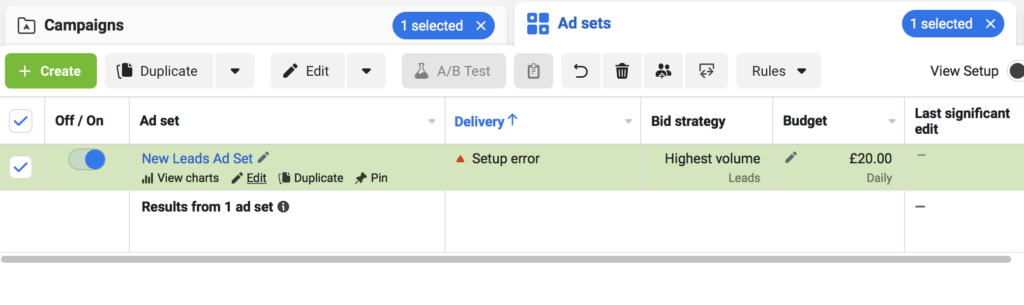
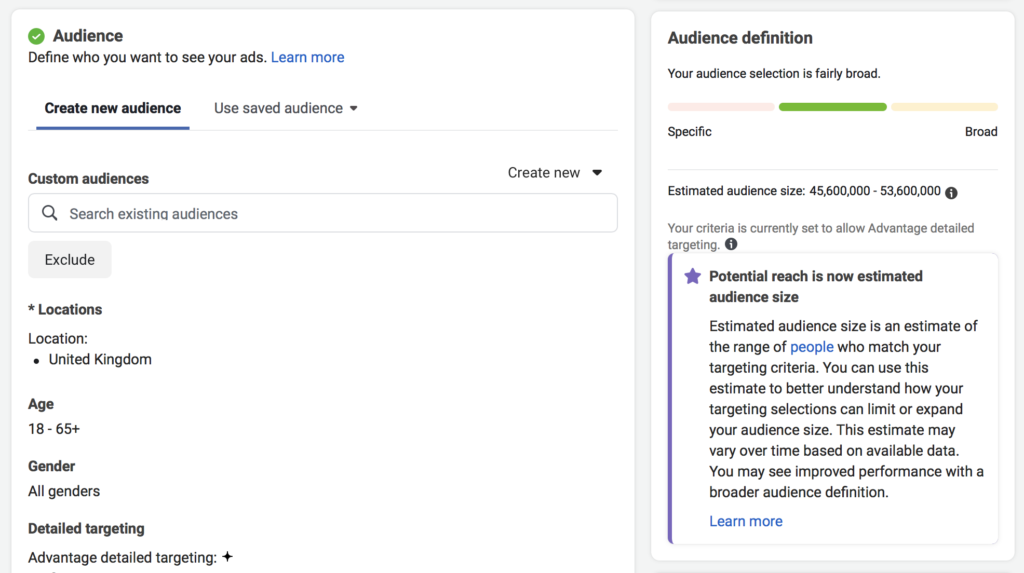
- Save Changes: Don’t forget to save your changes!
Common Mistakes to Avoid
There are common mistakes that can hinder your ad performance. Here’s what to avoid:
- Not understanding your target audience
- Overly broad or narrow targeting
- Ignoring Facebook’s recommended practices
FAQs About Changing Audience in Facebook Ads
The best part? We’ve compiled some frequently asked questions to help you further:
Can I change the audience after the ad is live?
Yes, you can edit the audience even after the ad is live. Just follow this simple guide: How to Change Audience Linked to Ad Facebook.
What are the best practices for audience targeting?
Mastering audience targeting on Facebook requires a strategic approach. Here are actionable best practices you can replicate:
- Define Your Target Audience: Understand who your ideal customers are. Consider demographics, interests, behaviours, and other factors that align with your product or service.
- Use Custom Audiences: Leverage Facebook’s Custom Audiences feature to target specific segments of your audience, such as previous website visitors or existing customers.
- Experiment with Lookalike Audiences: Create Lookalike Audiences to reach people who are similar to your existing customers. This can expand your reach to potential customers who are likely to be interested in your offerings.
- Monitor and Analyse Performance: Regularly review the performance of your ads and the engagement of your targeted audience. Use Facebook Analytics to identify what’s working and what needs adjustment.
- Test Different Targeting Options: Don’t be afraid to experiment with different targeting options. A/B testing different audiences can help you find the most effective approach for your specific goals.
- Comply with Facebook’s Guidelines: Ensure that your targeting practices adhere to Facebook’s advertising policies and guidelines to maintain a positive user experience.
By following these best practices, you can create more effective and relevant Facebook ads, leading to better engagement and ROI.
Conclusion
Changing the audience linked to a Facebook ad is a vital skill for advertisers. By following this guide, you can master the art of audience targeting and improve your ad performance.
If you’re looking to take your Facebook ad campaigns to the next level, don’t hesitate to reach out to softdata! With our team of Facebook experts managing thousands in ad spend every week, we have the experience and insights to optimise your campaigns for success. The best part? We’re here to provide that extra set of eyes, ensuring that every detail is tailored to your unique goals. Contact us today and discover how we can make your advertising efforts soar!
Get help from softdata Facebook ad specialists
We love helping businesses with their digital campaigns. From guides like this: ‘How to change audience linked to ad facebook’ or delivering £1k daily ad spends, we are your local Facebook ad expert.